Which HDMI Cable Do You Actually Need? A Simple Guide
Let’s be honest—HDMI cables aren’t exactly the most exciting thing to think about, but they do a pretty important job. They’re the little connectors behind your...
Let’s be honest—HDMI cables aren’t exactly the most exciting thing to think about, but they do a pretty important job. They’re the little connectors behind your TV, console, laptop, or streaming device that make everything actually work together. And if you’ve ever tried buying one, you’ll know how confusing all the different types and specs can be.
So, let’s strip it back and make it simple.
So… what is HDMI?
HDMI stands for High-Definition Multimedia Interface—but really, all you need to know is that it’s the cable that carries both picture and sound between your devices. Whether you’re watching Netflix, gaming, or just plugging your laptop into a TV, HDMI is doing the heavy lifting in the background.
The different types (without the headache)
Here’s how I tend to think about it:
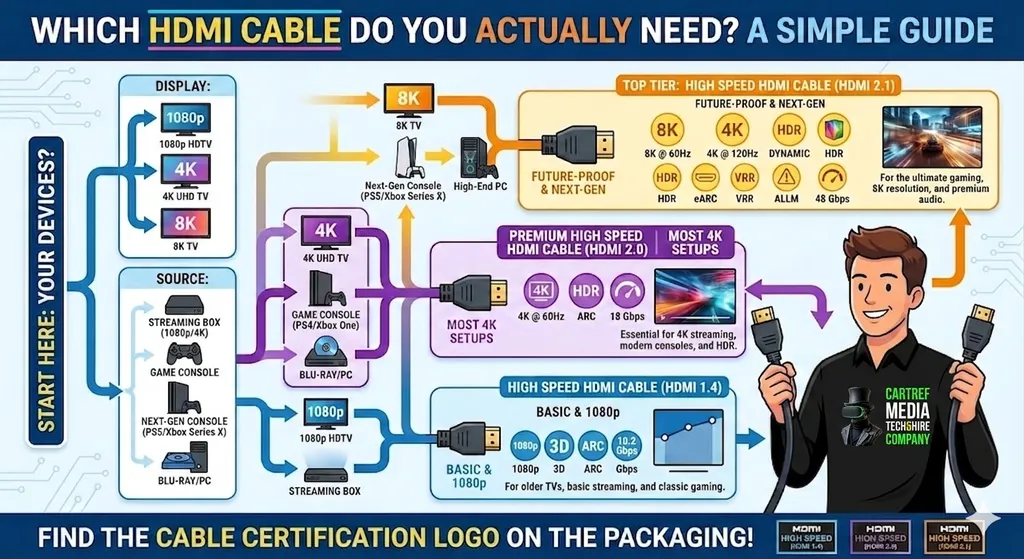
Standard HDMI
This is your basic option. It works fine for everyday stuff like watching TV, films, or casual gaming. Nothing fancy, but it gets the job done.High-Speed HDMI
This is probably what most people actually need these days. It supports things like 4K resolution, so if you’ve got a modern TV or console, this is the safe bet.Premium High-Speed HDMI
Think of this as a step up. Better colour (thanks to HDR) and improved sound. If you’re a bit more into your picture quality or have a nicer setup, this is worth considering.Ultra High-Speed HDMI
This one’s for people who really care about performance—gamers, content creators, or anyone running high-end gear. It handles things like 8K and very fast refresh rates.
Cable length – it actually matters
It’s tempting to just grab the longest cable “just in case”, but that’s not always the best move. Shorter cables are generally more reliable. If your devices are right next to each other, stick with a normal-length cable. If they’re further apart, a longer one is fine—just don’t go overboard, as super long cables can sometimes lose quality.
Do you need to spend loads?
Short answer: no.
You’ll see some really expensive HDMI cables out there, but for most setups, they don’t make a noticeable difference. A decent, reasonably priced cable will do exactly what you need. Don’t get caught out thinking higher price automatically means better picture.
Compatibility – worth a quick check
One thing that does matter is making sure your cable matches what your devices support. Newer TVs and consoles can use newer HDMI standards, so it’s worth checking if you want the best performance. If you’re not sure, a quick look online usually clears it up.
Mini and Micro HDMI – what are those?
You might also come across smaller versions of HDMI:
Mini HDMI
Used on things like cameras, tablets, and some laptops. Same idea as normal HDMI, just smaller.Micro HDMI
Even smaller again—often found on phones or action cameras. Handy if you want to show photos or videos on a bigger screen.
They work just like standard HDMI, just in a more compact form.
HDMI versions (don’t overthink it)
There are a few versions floating around:
HDMI 1.4 – older, but introduced things like 3D support
HDMI 2.0 – better for 4K and smoother playback
HDMI 2.1 – the latest, built for 8K, fast gaming, and top-end performance
In reality, unless you’re using cutting-edge gear, you don’t need to stress too much about versions—just make sure your cable isn’t holding your setup back.
So, what should you actually buy?
For most people, it’s simple:
👉 A good-quality High-Speed HDMI cable will cover pretty much everything.
Only step up to something more advanced if you know your setup needs it.
Final thoughts
HDMI cables can seem a bit overcomplicated at first, but once you break it down, it’s actually straightforward. Just think about what you’re connecting, how far apart your devices are, and what you want out of your setup.
Pick the right cable, plug it in, and you’re sorted.
And honestly? Save your money for something more fun—like what you’re actually going to watch or play.