Making Sense of Common Security Terms in Recent Windows Vulnerability Reports
Understanding Windows Security Terms: Zero‑Day Vulnerabilities & Patch Tuesday Explained. This post doesn’t focus on specific vulnerabilities or individuals. Instead, it explains some of the common security terms used in the article, in plain English, to help make future reporting easier to understand.
I recently read an article on The Register that discussed newly disclosed Windows security issues. While the technical details are important for specialists, the language used in reports like this can be confusing for non‑IT readers.
This post doesn’t focus on specific vulnerabilities or individuals. Instead, it explains some of the common security terms used in the article, in plain English, to help make future reporting easier to understand.
What is a “Windows vulnerability”?
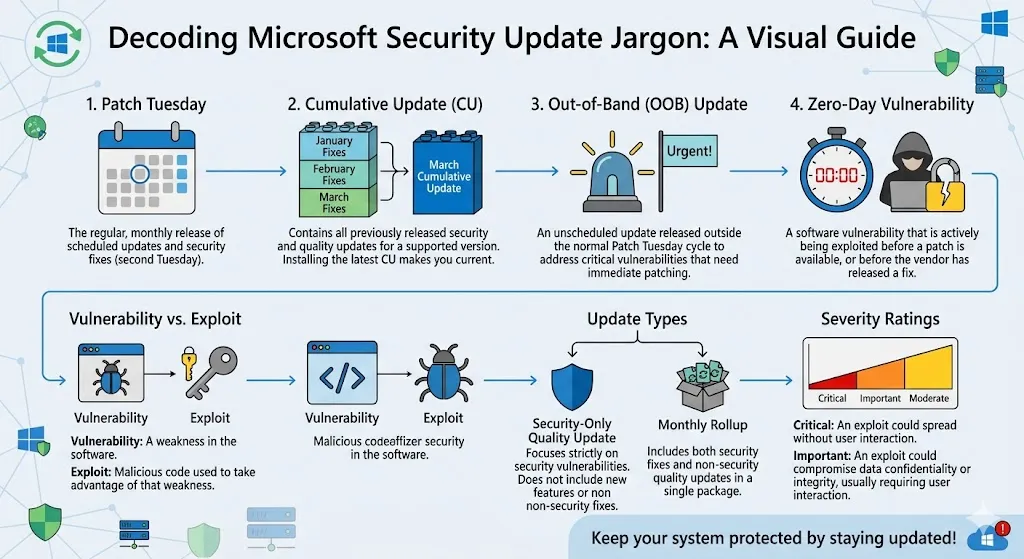
A vulnerability is simply a weakness or flaw in software that could potentially be misused.
Think of it like a faulty lock on a door — most of the time it may not cause a problem, but if someone finds it, they could use it to get access they shouldn’t have.
Vulnerabilities are discovered by security researchers, technology companies, and sometimes attackers. Once identified, vendors like Microsoft work to fix them.
What does “zero‑day vulnerability” mean?
A zero‑day vulnerability is a specific type of security flaw.
Microsoft defines a zero‑day as “a flaw in software for which no official patch or security update is available yet.”
The phrase “zero‑day” refers to the fact that defenders have had zero days to fix the issue since it became known. This is why zero‑days often attract attention — not necessarily because they’re being exploited, but because they currently lack an official fix.
Importantly, Microsoft has stated that this month it has not observed any included vulnerability being actively exploited in real‑world environments.
What is “Patch Tuesday”?
Patch Tuesday is Microsoft’s regular monthly update cycle.
It usually happens on the second Tuesday of every month
Microsoft releases fixes (“patches”) for known security issues in Windows and other products
Organisations and individuals are encouraged to install these updates promptly
Patch Tuesday exists to provide a predictable schedule so businesses can plan updates and reduce disruption, rather than reacting to constant emergency fixes.
What is “physical access”?
When a report says a vulnerability requires physical access, it means:
The attacker would need to be physically in possession of the device
This is very different from a remote attack over the internet
Physical‑access risks are most relevant for lost, stolen, or unattended devices, such as laptops.
What is BitLocker?
BitLocker is a built‑in Windows feature used to encrypt data on a computer.
Encryption ensures that even if a device is stolen, the data stored on it remains unreadable without proper authorisation.
For many organisations, BitLocker is considered a last line of defence for protecting sensitive information on mobile devices.
What does “privilege escalation” mean?
A privilege escalation issue doesn’t usually let someone break into a system from scratch.
Instead:
An attacker already has some access
The vulnerability could allow them to gain much higher control, such as administrator or system‑level permissions
This is similar to sneaking into a building as a visitor and then finding a way into the staff‑only or control rooms.
What is “post‑exploitation”?
Post‑exploitation refers to what happens after an attacker has already gained entry.
This stage may involve:
Gaining higher permissions
Accessing sensitive data
Moving to other systems on the same network
Many serious security incidents don’t rely on a single flaw, but on chains of smaller weaknesses used together.
Why do experts take these reports seriously?
When technical details are released publicly:
Defenders can better understand and protect against risks
Attackers also gain information, which can increase interest in certain weaknesses
This is why security teams closely monitor vulnerability disclosures, even when exploitation hasn’t been observed yet.
Final thoughts
Security reporting can sound dramatic or confusing if you’re not familiar with the terminology. Understanding a few key concepts — such as zero‑days, Patch Tuesday, physical access, and privilege escalation — makes it much easier to follow what’s actually being discussed.
Staying informed, keeping devices updated, and focusing on facts rather than speculation are the best responses for both organisations and individuals.